Beauty salon and health store solutions

Beauty salon and health store solutions

The service process is organized around store appointments, care records, card item consumption and employee commissions.

Beauty salon and health store solutions
  • Service bookings and staff schedules
  • Member profiles and care records
  • Stored value, passes and treatment redemption
  • Product and service checkout

Operating workflow

Connect the actions that keep each day moving

  1. Service bookings and staff schedules

    Set roles, rules and data around Service bookings and staff schedules, keeping the surrounding steps traceable.

  2. Member profiles and care records

    Set roles, rules and data around Member profiles and care records, keeping the surrounding steps traceable.

  3. Stored value, passes and treatment redemption

    Set roles, rules and data around Stored value, passes and treatment redemption, keeping the surrounding steps traceable.

  4. Product and service checkout

    Set roles, rules and data around Product and service checkout, keeping the surrounding steps traceable.

  5. Staff commission rules

    Set roles, rules and data around Staff commission rules, keeping the surrounding steps traceable.

  6. Follow-up and expiry reminders

    Set roles, rules and data around Follow-up and expiry reminders, keeping the surrounding steps traceable.

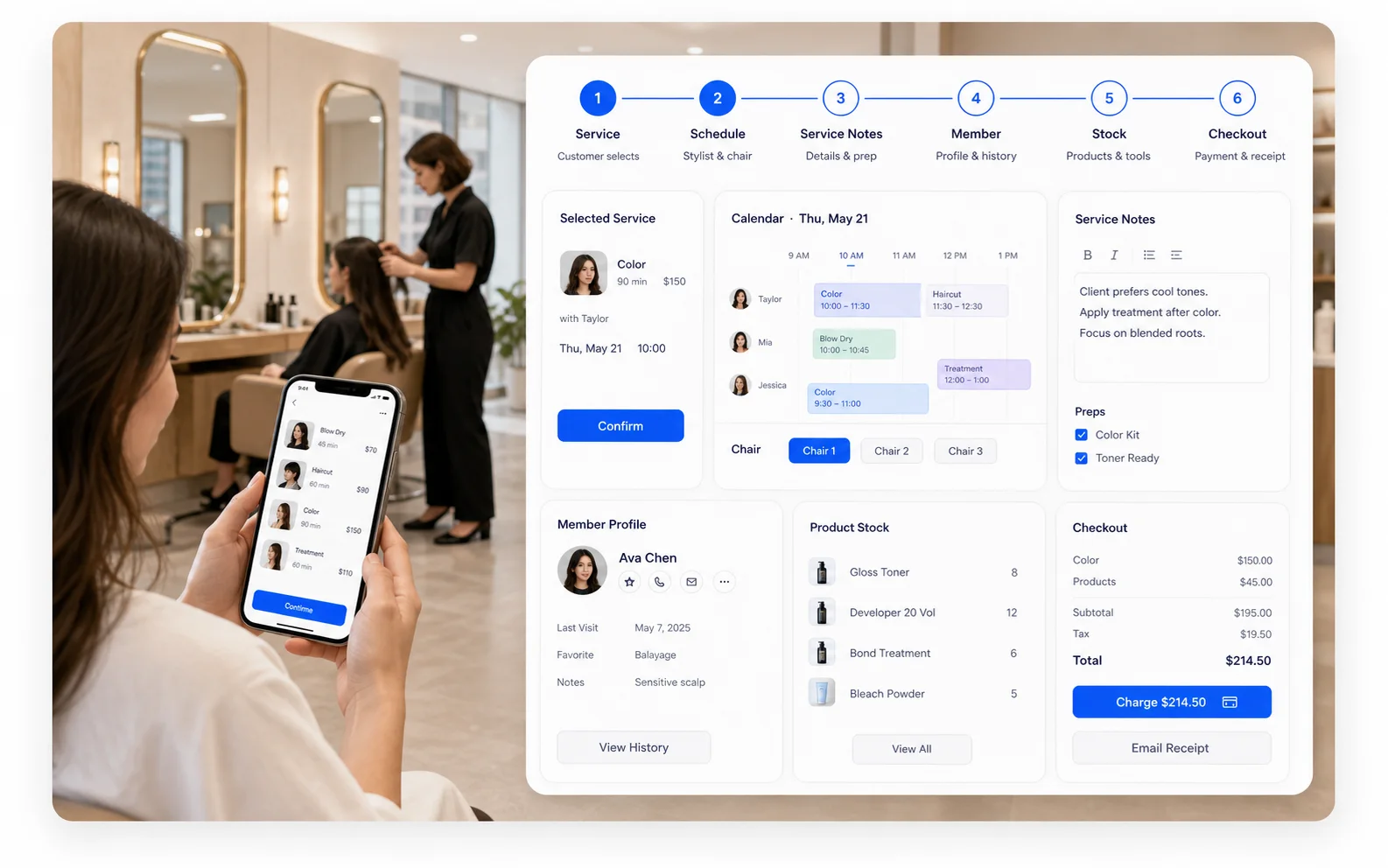
Three connected surfaces

Give every role the right working view

01

Desktop admin

Detailed configuration, bulk management, purchasing, inventory, reporting and multi-location control.

  • Service bookings and staff schedules
  • Member profiles and care records
  • Stored value, passes and treatment redemption
  • Product and service checkout
02

Mobile admin

Bookings, orders, members, stock and daily activity for staff on the move.

  • Service bookings and staff schedules
  • Member profiles and care records
  • Product and service checkout
  • Follow-up and expiry reminders
03

Customer web app

Bookings, ordering, queues, shopping, membership benefits and delivery entry points.

  • Service bookings and staff schedules
  • Product and service checkout
  • Follow-up and expiry reminders

Capability checklist

Verify the fit against your real workflow

Core operating capabilities

Service bookings and staff schedules
Desktop admin · Mobile admin · Customer web app
Set roles, rules and data around Service bookings and staff schedules, keeping the surrounding steps traceable.
Member profiles and care records
Desktop admin · Mobile admin · Customer web app
Set roles, rules and data around Member profiles and care records, keeping the surrounding steps traceable.
Stored value, passes and treatment redemption
Desktop admin · Mobile admin
Set roles, rules and data around Stored value, passes and treatment redemption, keeping the surrounding steps traceable.
Product and service checkout
Desktop admin · Mobile admin
Set roles, rules and data around Product and service checkout, keeping the surrounding steps traceable.
Staff commission rules
Desktop admin · Mobile admin
Set roles, rules and data around Staff commission rules, keeping the surrounding steps traceable.
Follow-up and expiry reminders
Desktop admin · Customer web app
Set roles, rules and data around Follow-up and expiry reminders, keeping the surrounding steps traceable.
01

Prepare for launch

Prepare locations, staff roles, products or services, customers and stock, then use one real operating journey for the demo and acceptance check.

02

Implementation boundaries

Payments, printers, delivery, hardware, historical migration and third-party compatibility require deployment-specific confirmation. A visible interface is not a default integration promise.

FAQ

Frequently asked questions

Can we use only one admin surface?

Yes, by role, although connected surfaces provide the most complete operating loop.

Can existing customer and product data be migrated?

Fields, data quality, balances and history must be assessed before a migration approach is confirmed.

Can each location work differently?

Location settings, permissions and operating rules provide flexibility; non-standard requirements need separate assessment.

How long does launch take?

Timing depends on data readiness, workflow complexity, migration and any external device or system integration.